Zoom Settings Guide
Configure your Zoom account to allow Gia to record and transcribe your meetings.
SetupManage Your Zoom Settings
- Sign in to your Zoom account
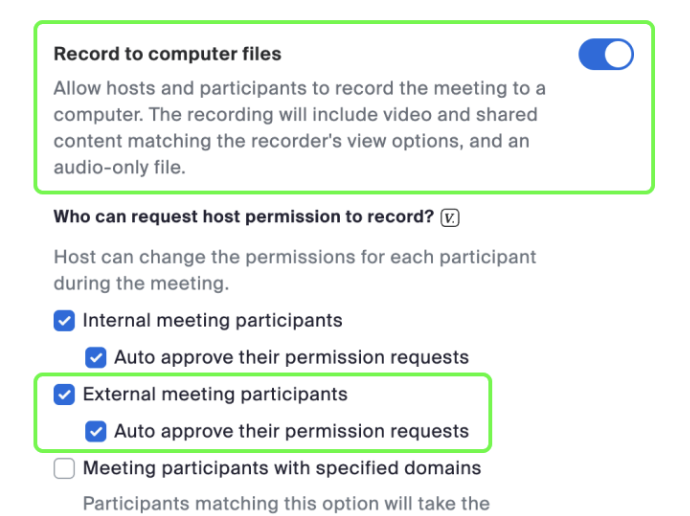
- Under Personal on the left navigation menu, click Settings. Navigate to the Recording tab.
- Toggle ON Record to computer files
- Checkmark External meeting participants
- Checkmark Auto approve their permission request
- Click Save
Manual Consent Dialog
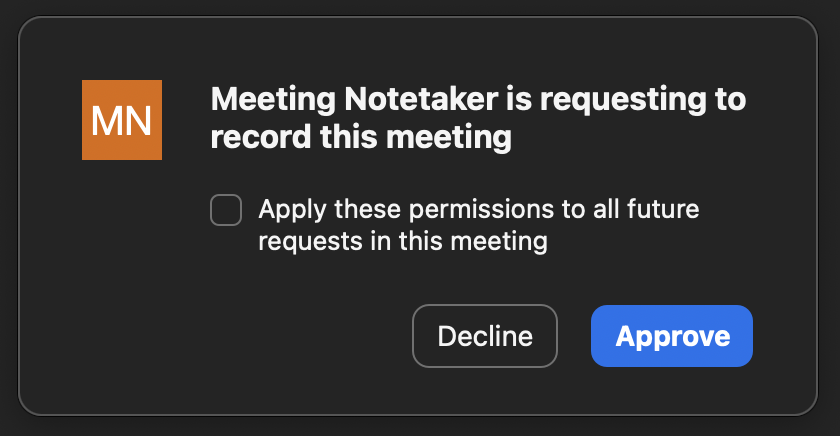
At Gia, the method used for obtaining consent on Zoom is through the manual recording consent dialog. This is the default consent mechanism provided by Zoom, and no additional configuration is required.
How It Works in Practice
- The Gia bot joins the Zoom call
- If the host is present, they receive a Zoom recording consent dialog
- The host must explicitly approve the request. Once approved, the bot begins recording.
Important Notes
- The consent dialog is displayed only to the meeting host
- Recording will not start unless the host provides approval
- This ensures all recordings through Gia are compliant with Zoom's built-in consent workflow